Loading
New app: JPortal
Abstract
Please introduce the functions and usage of your app in summary, and also attach some screenshots.
JPortal is an unofficial native client for the JIIT (Jaypee Institute of Information Technology) student webportal. Students sign in once with their JIIT Google account and get:
- Attendance: a ring per subject counted class by class, how many classes can be missed or must be attended to reach a target, and a calendar of every class.
- Exams: the date sheet with rooms and seats, a countdown to the next paper, and optional sync to the device calendar.
- Grades: SGPA and CGPA per semester with a what-if for future semesters, grade cards, and marks for every exam event.
- Profile: fees, hostel, bank details and feedback forms.
Everything is cached on the device, so the app works offline and every screen says how old its data is. It is written in Kotlin with Jetpack Compose and Material 3. There are no ads, analytics, crash reporting or tracking, and nothing is sent to the developer.
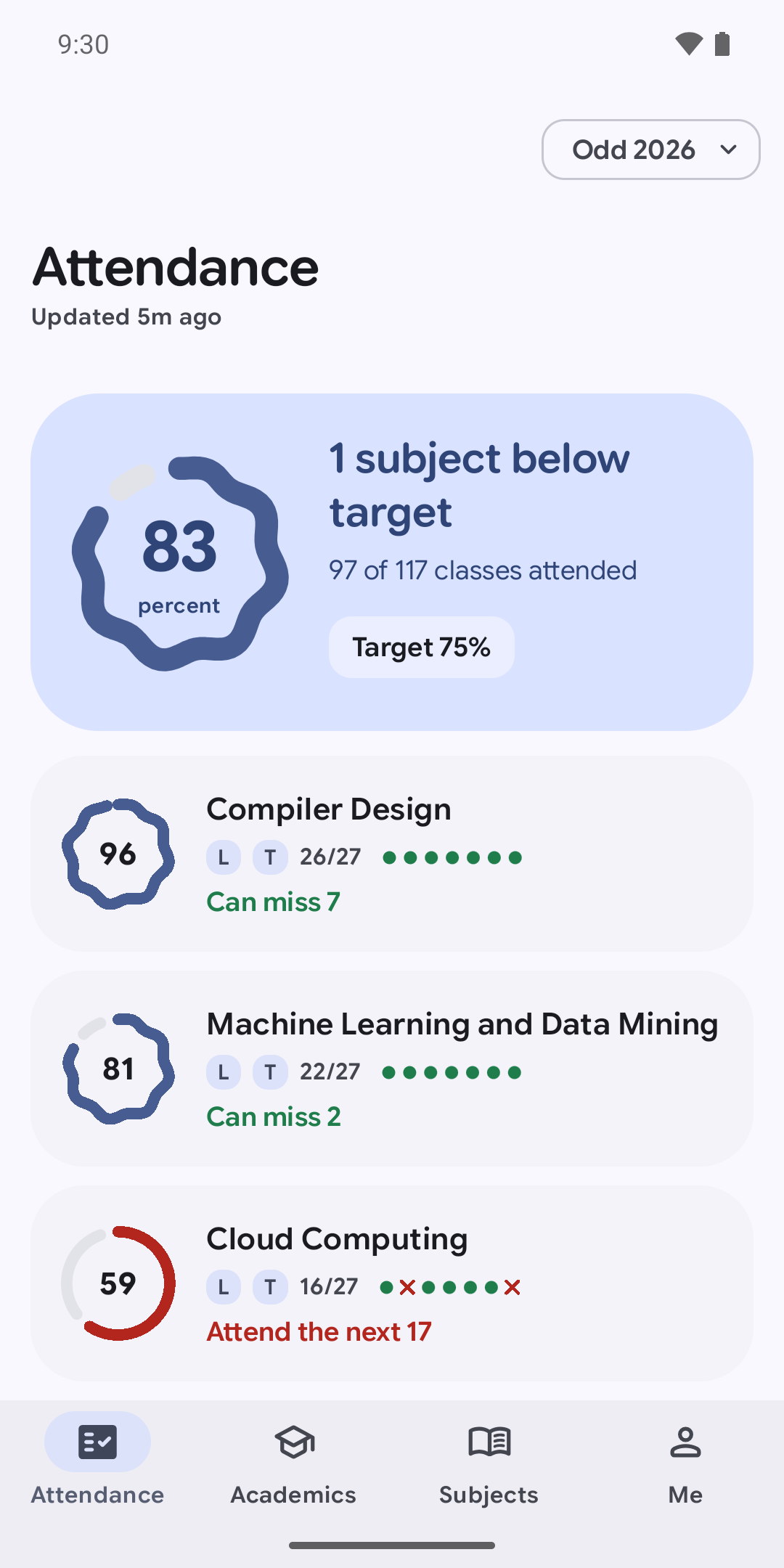
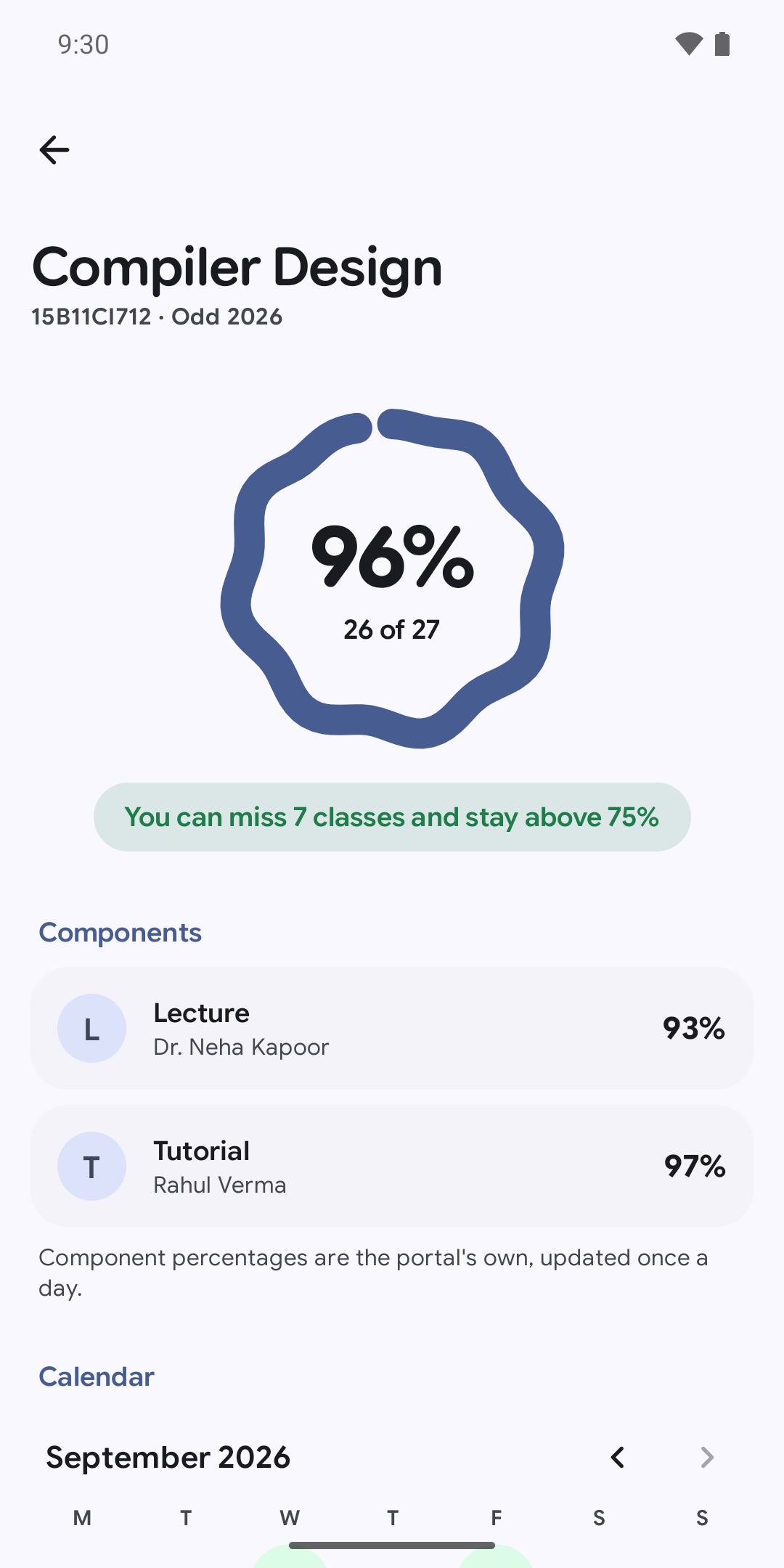
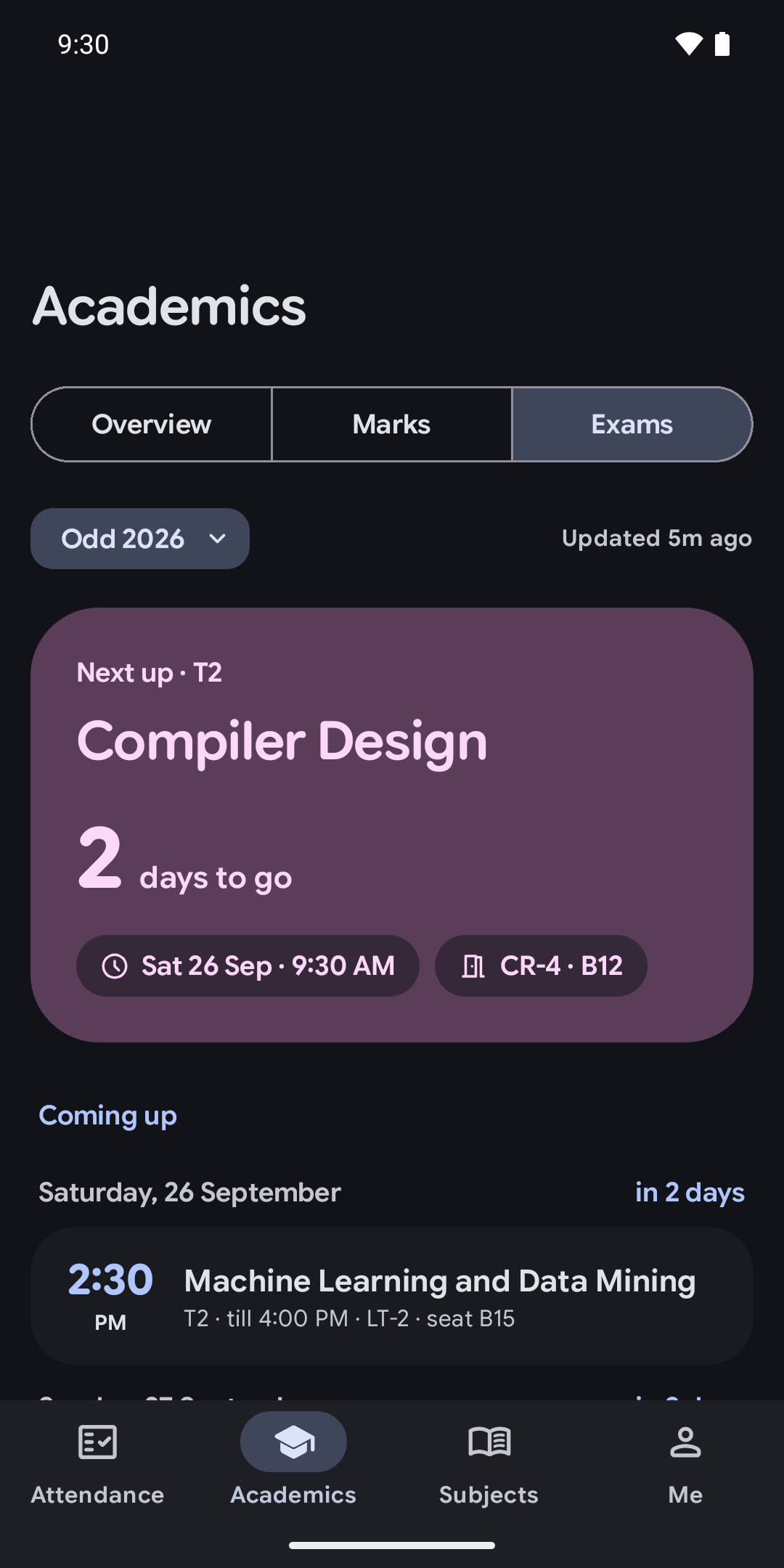
Please elaborate why you wrote this app. Please highlight the unique functions it provides over other similar apps in F-Droid.
The official portal is a slow web page that is awkward on a phone and useless without a connection. JPortal started as a web app; when the portal moved students to Google sign-in, I rebuilt it as a native Android app so it could keep working, stay signed in, and work offline.
It is specific to one university's portal, so I am not aware of any similar app in F-Droid. Compared with the portal itself it adds exact per-class attendance counts and skip/attend projections, CGPA what-if planning, marks parsed from the portal's PDF reports, exam calendar sync, and offline access.
Notes for reviewers
- NonFreeNet is declared: the app only talks to the JIIT webportal and signs in through Google, in a WebView. It has no Google Play Services or other proprietary dependencies.
- Update check: the app can ask the GitHub API for a newer release, but only if the user turns that on in Settings. It is off by default, and it only shows a notice; it never downloads anything.
- Reproducible builds are enabled. I rebuilt v0.1.1 from the pipeline's output and compared it with the GitHub release using
apksigcopier compare; they match. - All of the app's features can be tested without an official account, on the first sign-in page, on the top-right there is a demo button which allows you to test drive every feature using artifical data
Checklist
Policy
- The app complies with the inclusion criteria.
- The original app author has been notified (and does not oppose the inclusion). If you are not the author, please paste the link of the reply from the author. (I am the author.)
- The upstream app source code repo contains the app metadata in a Fastlane or Triple-T folder structure. The summary and description must be included and images, icon, and changelog should also be provided for better user experience. The
en-USlocale must be included.
Docs
- Please read the guide first if this is your first contribution.
- Please make sure your metadata follows the best practice in our templates.
- Please read the Build Metadata Reference and make sure your metadata is valid.
- Please read the Quick Start Guide.
Merge Request Setup
- The title of this merge request should follow "New app: app name" format.
- Please make sure your fdroiddata fork is public and your branch is not protected. See https://docs.gitlab.com/user/project/repository/branches/protected/.
- Please read our Git guide if you don't know how to rebase your branch. Don't rebase your branch if there is no conflict.
- All related fdroiddata and RFP issues have been referenced in this merge request
- Please only submit one app in one MR.
Metadata
- Metadata must be put in
metadata/<applicationId>.yml. - Metadata must be a valid YAML file.
- Metadata must use LF as line ending.
- Don't add summary/description/changelog/images or anything that should be provided in upstream repo. Please check the Changes tab to make sure there is no other unrelated files added in the MR.
- Releases are tagged and auto update is enabled unless there is a special reason.
- There is an issue tracker and contact info of the author so that we can report bugs and contact the author.
- An AuthorName must be added. It doesn't need to be the real name.
- External repos are added as git submodules instead of srclibs. You can update git submodules without opening an MR in this repo and the submodule is covered by our scanner.
- Enable Reproducible Builds. We'll use your signature for improved security/reliability, also allowing users to switch between different channels. Do note that if you don't enable reproducible build then the apk will be signed with our key so you can't enable it later. If you can't enable this, please add the reasons here.
- Setup abi split if the APK is large and the splitted ones can be much smaller. (Not needed: the APK is 2 MB and its only native code is a ~37 KB AndroidX library.)
- Only the latest versions should be kept in the metadata before it's merged. If you update the metadata, please replace the old versions with the new ones.
- Don't add any disabled versions in the metadata.
- The
commitfield should be the full hash. Please don't use tag or branch in commit.
Pipeline
- All pipelines should pass.
- All warnings and errors in the Reports tab should be fixed or explained.
- F-Droid CI runners are under GitLab's FOSS program, so there's no need for you to pay for any CI time. If Gitlab starts asking for phone numbers or credit cards don't submit anything, just leave a note in the MR so we know we need to trigger the CI.
Edited by Harsh Sharma