OpenXML Filter: merge different font style run
Created by: yan cheng
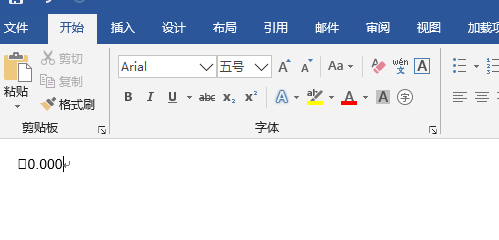
In the docx file shown below, the first is a special character that corresponds to the run tag
<w:r>
<w:rPr>
<w:rFonts w:ascii="Symbol" w:eastAsia="Symbol" w:hAnsi="Symbol" w:cs="Symbol"/>
<w:szCs w:val="21"/>
</w:rPr>
<w:t></w:t>
</w:r>
<w:r>
<w:rPr>
<w:rFonts w:ascii="Arial" w:hAnsi="Arial" w:cs="Arial"/>
<w:szCs w:val="21"/>
</w:rPr>
<w:t>0.000</w:t>
</w:r>Obviously their fonts are different, but during the parsing process, the RunMerger class execution method canMergeWith mistakenly assumes that they have the same format, which eventually causes the XLF file trans-unit format to be parsed as
<trans-unit id="NFDBB2FA9-tu1" xml:space="preserve">
<source xml:lang="en-US"><g id="1">0.000</g></source>
<seg-source><mrk mid="0" mtype="seg"><g id="1">0.000</g></mrk></seg-source>
<target xml:lang="zh-CN"><mrk mid="0" mtype="seg"><g id="1">0.000</g></mrk></target>
</trans-unit>Ideally, it would look like this
<trans-unit id="NFDBB2FA9-tu1" xml:space="preserve">
<source xml:lang="en-US"><g id="1"></g><g id="2">0.000</g></source>
<seg-source><mrk mid="0" mtype="seg"><g id="1"></g><g id="2">0.000</g></mrk></seg-source>
<target xml:lang="zh-CN"><mrk mid="0" mtype="seg"><g id="1"></g><g id="2">0.000</g></mrk></target>
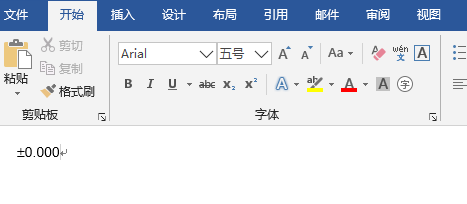
</trans-unit>According to the current parsing situation, which is the content in the first trans-unit tag, I modified the XLF file after my translation, and finally exported the translation as follows
<w:r>
<w:rPr>
<w:rFonts w:ascii="Arial" w:hAnsi="Arial" w:cs="Arial"/>
<w:szCs w:val="21"/>
</w:rPr>
<w:t>0.000</w:t>
</w:r>Then the font of the first special character was also changed and displayed in office as