Local labels create connections between top level sheets
# Description
According to the KiCad manual, “local labels” do not connect wires/nets across sheets:
[{width="690" height="84"}](https://kicad-info.s3.dualstack.us-west-2.amazonaws.com/original/3X/b/c/bc317c99322d6f6960d74ae339194a342ccdc20b.png "image")
[image1172×144 16.9 KB](https://kicad-info.s3.dualstack.us-west-2.amazonaws.com/original/3X/b/c/bc317c99322d6f6960d74ae339194a342ccdc20b.png "image")
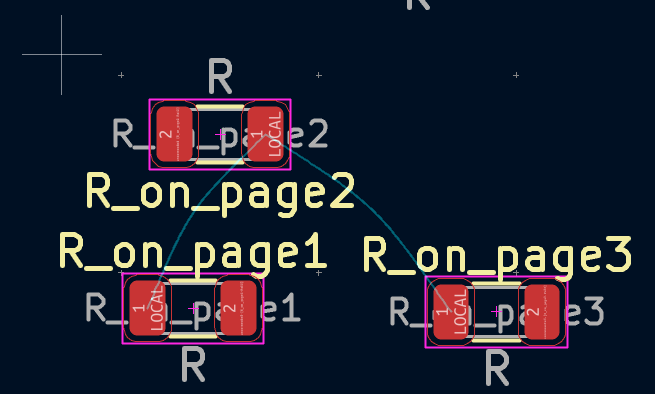
However, I observe that the PCB editor shows ratsnest lines between "local" nets from different sheets. Obviously, these "local" nets are connected across top level schematic sheets.
# Steps to reproduce
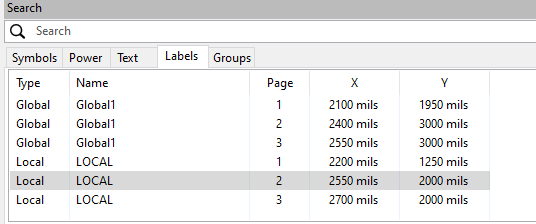
1. Create three top level sheets (pages) in Schematic Editor, draw some wires, add resistors to each and attached the same local name “LOCAL” to them:
[{width="536" height="224"}](https://kicad-info.s3.dualstack.us-west-2.amazonaws.com/original/3X/5/8/5862b863ddde13c65fd4043ce0d6427e331d5f29.png "image")
[image536×224 5.68 KB](https://kicad-info.s3.dualstack.us-west-2.amazonaws.com/original/3X/5/8/5862b863ddde13c65fd4043ce0d6427e331d5f29.png "image")
2. Generate the board.
3. Observe in PCB editor that all “LOCAL” nets are connected by "ratsnest" lines:
[{width="655" height="394"}](https://kicad-info.s3.dualstack.us-west-2.amazonaws.com/original/3X/2/0/206d20952d9aedd7c1dd311b60a20e087ca16fc1.png "image")
[image655×394 15.2 KB](https://kicad-info.s3.dualstack.us-west-2.amazonaws.com/original/3X/2/0/206d20952d9aedd7c1dd311b60a20e087ca16fc1.png "image")
Example project attached.
[test02.zip](/uploads/96114a1a70b025911c472e6fb0cc739e/test02.zip)
# KiCad Version
<!--Copy version information (from main menu Help->About KiCad ->Copy Version Info) and paste it between the triple backticks below to preserve the formatting.-->
```
```
```
Application: KiCad Schematic Editor x64 on x64
Version: 10.0.2, release build
Libraries:
wxWidgets 3.3.2
FreeType 2.13.3
HarfBuzz 12.3.0
FontConfig 2.17.1
Platform: Windows 10 (build 19045), 64-bit edition, 64 bit, Little endian, wxMSW
OpenGL: Intel, Intel(R) HD Graphics 4600, 4.3.0 - Build 20.19.15.4835
wxWidgets: 3.3.2 (wchar_t,STL containers)
Boost: 1.90.0
OCC: 7.9.2
Curl: 8.18.0
ngspice: 46
Compiler: Visual C++ 1944 without C++ ABI
KICAD_IPC_API=ON
KICAD_USE_PCH=OFF
Locale:
Lang: de_DE
Enc: UTF-8
Num: 1.234,5
Encoded кΩ丈: D0BACEA9E4B888 (sys), D0BACEA9E4B888 (utf8)
```
issue